Replacement Doxie Go SE battery
Doxie Go SE features a user-replaceable battery. Lithium-ion batteries have a long but finite life. Over time and many charge cycles, any lithium-ion battery will hold less and less of a charge. Eventually, you might want to replace your Doxie's battery with a new one as a result. You might also want a second battery so you can swap batteries on the go for when you have a ridiculous amount to scan, but no access to power.
You can order a replacement battery from Doxie here.
Please note...
- Never use third-party batteries. This includes the cheap, no name ones you find on Amazon.
- Don't use third-party battery chargers. Only charge Doxie's battery inside the scanner.
Replacing Doxie's battery
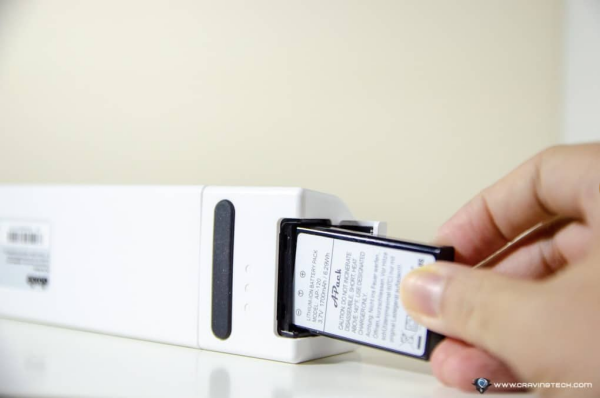
- Open Doxie's battery door
- Tip Doxie on-end to slide the battery out
- If the battery doesn't slide out, give Doxie a few hearty, vertical shakes to loosen the battery (with gravity on your side)
- Insert the new battery - make sure it's right side up and be sure to note the polarity indicators
If you’ve inserted the battery, but your Doxie won’t turn on, the battery needs to be charged. Connect Doxie to a USB power source and charge it for 20 minutes or so to get an initial charge enough to turn Doxie on.
Never use any metal object like a knife or screwdriver to pry out Doxie's battery as this may damage the battery or Doxie. If you're having trouble removing Doxie's battery, please contact Doxie Customer Care for assistance.